Boton Instagram


<!-- CODIGO HTML --> 
<button class="Btn">
 <span class="svgContainer">
   <svg fill="white" class="svgIcon" viewBox="0 0 448 512" height="1.5em" xmlns="http://www.w3.org/2000/svg">
     <path d="M224.1 141c-63.6 0-114.9 51.3-114.9 114.9s51.3 114.9 114.9 114.9S339 319.5 339 255.9 287.7 141 224.1 141z"></path>
   </svg>
 </span>
 <span class="BG"></span>
</button>
<!-- CODIGO CSS --> 
/* From Uiverse.io by vinodjangid07 */ 
.Btn {
  width: 45px;
  height: 45px;
  display: flex;
  align-items: center;
  justify-content: center;
  border: none;
  background-color: transparent;
  position: relative;
  /* overflow: hidden; */
  border-radius: 7px;
  cursor: pointer;
  transition: all .3s;
}

.svgContainer {
  width: 100%;
  height: 100%;
  display: flex;
  align-items: center;
  justify-content: center;
  background-color: transparent;
  backdrop-filter: blur(4px);
  letter-spacing: 0.8px;
  border-radius: 10px;
  transition: all .3s;
  border: 1px solid rgba(156, 156, 156, 0.466);
}

.BG {
  position: absolute;
  content: "";
  width: 100%;
  height: 100%;
  background: #f09433;
  background: -moz-linear-gradient(45deg, #f09433 0%, #e6683c 25%, #dc2743 50%, #cc2366 75%, #bc1888 100%);
  background: -webkit-linear-gradient(45deg, #f09433 0%,#e6683c 25%,#dc2743 50%,#cc2366 75%,#bc1888 100%);
  background: linear-gradient(45deg, #f09433 0%,#e6683c 25%,#dc2743 50%,#cc2366 75%,#bc1888 100%);
  filter: progid:DXImageTransform.Microsoft.gradient( startColorstr='#f09433', endColorstr='#bc1888',GradientType=1 );
  z-index: -1;
  border-radius: 9px;
  pointer-events: none;
  transition: all .3s;
}

.Btn:hover .BG {
  transform: rotate(35deg);
  transform-origin: bottom;
}

.Btn:hover .svgContainer {
  background-color: rgba(156, 156, 156, 0.466);
}

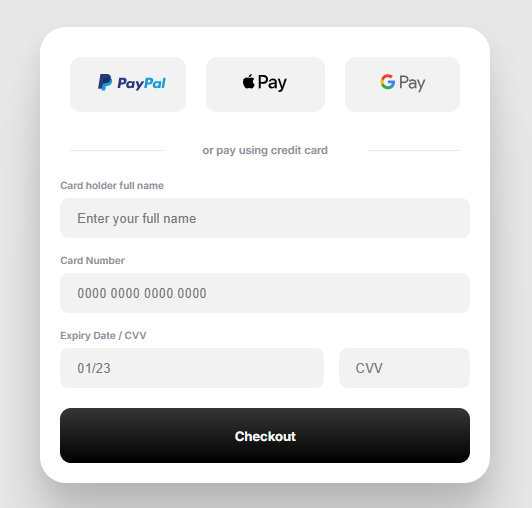
Proyecto sistemas de pago


<!-- Codigo html --> 
<div class="modal">
<form class="form">

  <div class="payment--options">

    <button name="paypal" type="button">
      <svg viewBox="0 0 124 33">
        <path d="SVG PAYPAL PATH DATA..."></path>
      </svg>
    </button>

    <button name="apple-pay" type="button">
      <svg viewBox="0 0 512 210.2">
        <path d="SVG APPLE PATH DATA..."></path>
      </svg>
    </button>

    <button name="google-pay" type="button">
      <svg viewBox="0 0 80 39">
        <path d="SVG GOOGLE PATH DATA..."></path>
      </svg>
    </button>

  </div>

  <div class="separator">
    <hr class="line">
    <p>or pay using credit card</p>
    <hr class="line">
  </div>

  <div class="credit-card-info--form">

    <div class="input_container">
      <label class="input_label">Card holder full name</label>
      <input class="input_field" type="text" placeholder="Enter your full name">
    </div>

    <div class="input_container">
      <label class="input_label">Card Number</label>
      <input class="input_field" type="number" placeholder="0000 0000 0000 0000">
    </div>

    <div class="input_container">
      <label class="input_label">Expiry Date / CVV</label>
      <div class="split">
        <input class="input_field" type="text" placeholder="01/23">
        <input class="input_field" type="number" placeholder="CVV">
      </div>
    </div>

  </div>

  <button class="purchase--btn">Checkout</button>

</form>
</div>


/* Codigo CSS */ 
.modal {
  width: fit-content;
  height: fit-content;
  background: #FFFFFF;
  box-shadow: 0px 187px 75px rgba(0, 0, 0, 0.01), 0px 105px 63px rgba(0, 0, 0, 0.05), 0px 47px 47px rgba(0, 0, 0, 0.09), 0px 12px 26px rgba(0, 0, 0, 0.1), 0px 0px 0px rgba(0, 0, 0, 0.1);
  border-radius: 26px;
  max-width: 450px;
}

.form {
  display: flex;
  flex-direction: column;
  gap: 20px;
  padding: 20px;
}

.payment--options {
  width: calc(100% - 40px);
  display: grid;
  grid-template-columns: 33% 34% 33%;
  gap: 20px;
  padding: 10px;
}

.payment--options button {
  height: 55px;
  background: #F2F2F2;
  border-radius: 11px;
  padding: 0;
  border: 0;
  outline: none;
}

.payment--options button svg {
  height: 18px;
}

.payment--options button:last-child svg {
  height: 22px;
}

.separator {
  width: calc(100% - 20px);
  display: grid;
  grid-template-columns: 1fr 2fr 1fr;
  gap: 10px;
  color: #8B8E98;
  margin: 0 10px;
}

.separator > p {
  word-break: keep-all;
  display: block;
  text-align: center;
  font-weight: 600;
  font-size: 11px;
  margin: auto;
}

.separator .line {
  display: inline-block;
  width: 100%;
  height: 1px;
  border: 0;
  background-color: #e8e8e8;
  margin: auto;
}

.credit-card-info--form {
  display: flex;
  flex-direction: column;
  gap: 15px;
}

.input_container {
  width: 100%;
  height: fit-content;
  display: flex;
  flex-direction: column;
  gap: 5px;
}

.split {
  display: grid;
  grid-template-columns: 4fr 2fr;
  gap: 15px;
}

.split input {
  width: 100%;
}

.input_label {
  font-size: 10px;
  color: #8B8E98;
  font-weight: 600;
}

.input_field {
  width: auto;
  height: 40px;
  padding: 0 0 0 16px;
  border-radius: 9px;
  outline: none;
  background-color: #F2F2F2;
  border: 1px solid #e5e5e500;
  transition: all 0.3s cubic-bezier(0.15, 0.83, 0.66, 1);
}

.input_field:focus {
  border: 1px solid transparent;
  box-shadow: 0px 0px 0px 2px #242424;
  background-color: transparent;
}

.purchase--btn {
  height: 55px;
  background: #F2F2F2;
  border-radius: 11px;
  border: 0;
  outline: none;
  color: #ffffff;
  font-size: 13px;
  font-weight: 700;
  background: linear-gradient(180deg, #363636 0%, #1B1B1B 50%, #000000 100%);
  box-shadow: 0px 0px 0px 0px #FFFFFF, 0px 0px 0px 0px #000000;
  transition: all 0.3s cubic-bezier(0.15, 0.83, 0.66, 1);
}

.purchase--btn:hover {
  box-shadow: 0px 0px 0px 2px #FFFFFF, 0px 0px 0px 4px #0000003a;
}

/* Reset input number styles */
.input_field::-webkit-outer-spin-button,
.input_field::-webkit-inner-spin-button {
  -webkit-appearance: none;
  margin: 0;
}

.input_field[type=number] {
  -moz-appearance: textfield;
}
